A charging station can look ready while silently rejecting a vehicle, delaying drivers and confusing support teams. This raises a practical question: What are the common error codes on OCPP charging stations? Understanding these messages helps operators separate communication failures from connector, payment, authentication, and electrical problems.
OCPP, or the Open Charge Point Protocol, connects a charge point with its central management system. When that connection weakens, codes such as “Unavailable,” “Faulted,” “Unauthorized,” or “Error” may appear. Some stations also report transaction-related problems, including failed authorization, interrupted charging, or missing meter values. The exact wording varies between firmware versions and manufacturers. That detail matters.
Sander van der Wal, an OCPP specialist and charging-infrastructure engineer, explains: “An error code is not a diagnosis; it is the beginning of one.” Technicians should therefore inspect the timestamp, connector status, heartbeat history, network signal, and backend logs. A simple restart may restore service, but it can also hide a recurring fault. That is easy to miss.
This guide examines ten common OCPP charging station error codes and explains what each one usually means in the field. It also connects each code with practical checks, from testing the vehicle plug to reviewing authorization responses. Screenshots, log entries, and a cold, unresponsive connector often reveal more than the displayed code. Not always.
Readers should treat these codes as clues, not absolute answers. OCPP implementations differ, and some vendors use custom descriptions. Careful diagnosis remains essential for reliable uptime, safer maintenance, and a better charging experience.
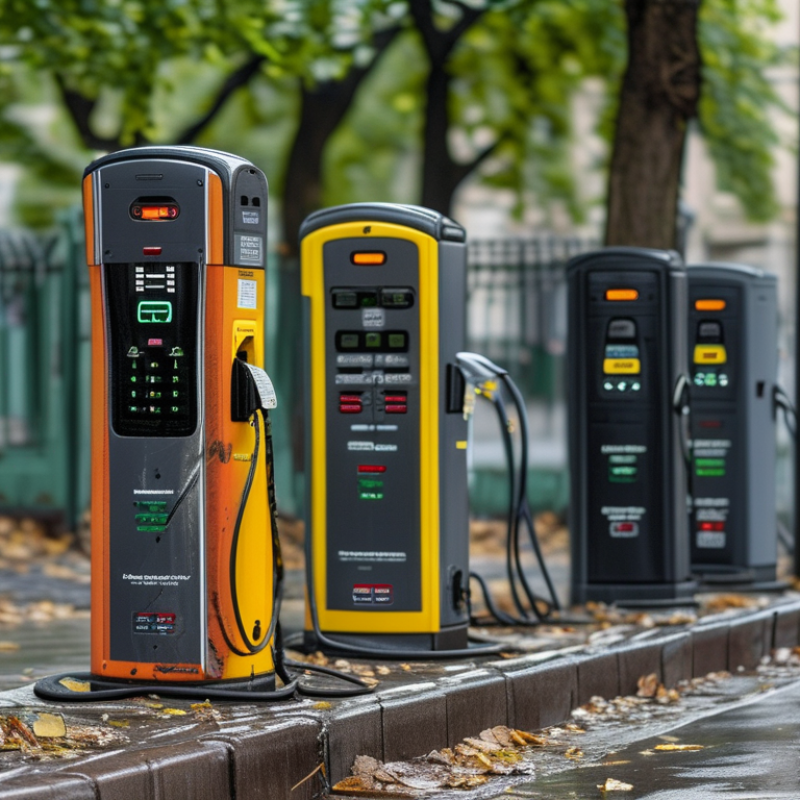
What OCPP Error Codes Mean in EV Charging Systems
Top 10 Common OCPP Charging Station Error Codes?
OCPP error codes describe faults reported between a charging station and its central system. They help technicians separate communication issues from electrical or hardware problems. In practice, the same message may have different causes. Firmware versions and station configurations also affect interpretation. A code is a starting point, not a final diagnosis.
Common codes include:
ConnectorLockFailure means the plug lock did not engage or release correctly.
EVCommunicationError indicates failed communication between the vehicle and charger.
GroundFailure suggests a protective grounding problem.
HighTemperature can reflect blocked airflow, a hot cabinet, or a faulty sensor.
InternalError points to an unexpected software or controller fault.
OvercurrentFailure means measured current exceeded a safe limit.
Other frequent codes are:
PowerMeterFailure affects energy measurement and billing accuracy.
PowerSwitchFailure suggests that a relay or switching device did not respond.
ReaderFailure may involve card, token, or local authorization hardware.
UnderVoltage means the supply fell below the expected range.
Technicians should check event logs, connector condition, input voltage, temperature readings, and recent resets. A loose terminal can imitate a deeper control fault. That detail is easy to miss.
Remote resets may restore service, but repeated resets can hide the real problem. OCPP logs become more useful when matched with physical inspection and measured electrical values.
The 10 Most Common OCPP Charging Station Error Codes
The 10 Most Common OCPP Charging Station Error Codes
OCPP error codes help operators identify charging failures through standardized status messages. Their meaning can vary between OCPP versions and station firmware. InternalError and OtherError often indicate software, configuration, or hardware problems. ConnectorLockFailure may appear when the plug cannot lock securely. EVCommunicationError usually involves failed communication between the vehicle and charger. GroundFailure can signal insulation or grounding concerns. HighTemperature often reflects blocked airflow, a hot cabinet, or a faulty sensor. Do not reset blindly.
The remaining frequent codes include OverCurrentFailure, PowerMeterFailure, PowerSwitchFailure, and UnderVoltage. OverCurrentFailure may result from vehicle demand, wiring limits, or an inaccurate sensor. PowerMeterFailure can affect energy readings and billing data. PowerSwitchFailure may prevent safe power delivery. UnderVoltage commonly points to supply instability or overloaded electrical circuits. A multimeter, thermal inspection, and event-log review can reveal different causes behind the same code.
Experienced technicians compare the OCPP message with connector state, cable condition, temperature, and recent power changes. They also check whether the error affects one connector or the entire station. A single code rarely tells the whole story. Field investigations sometimes expose loose terminals rather than damaged charging modules. Firmware updates can help, but they are not a universal cure. Record the timestamp, transaction ID, measured voltage, and recovery result before replacing parts. That evidence supports safer maintenance and more reliable remote troubleshooting.
How to Diagnose OCPP Errors Step by Step
Top 10 Common OCPP Charging Station Error Codes?
How to Diagnose OCPP Errors Step by Step
When an OCPP station reports a fault, begin with the exact timestamp, connector number, and error code. Do not rely on the screen alone. Check the central system logs, heartbeat messages, and the latest status notification. Codes such as GroundFailure, OverVoltage, UnderVoltage, and HighTemperature often point to electrical or thermal conditions. ConnectorLockFailure may indicate a damaged latch, poor alignment, or a sensor problem.
Inspect the physical setup carefully. Look for loose cables, blocked ventilation, moisture, and unusual heat around the connector. Confirm that the station has stable power before restarting it. A reset can clear a temporary InternalError, but repeated resets may hide the real cause. Check whether the failure affects one connector or the entire station. That distinction matters. One connector suggests a local hardware issue, while multiple failures may involve power, networking, or configuration.
Review communication logs for weak signals, rejected requests, or missing acknowledgements. Compare the station’s firmware settings with the server profile, including connector status and transaction limits. Record every change. This is where troubleshooting becomes reliable, not guesswork. If PowerMeterFailure or PowerSwitchFailure appears, stop repeated remote commands and arrange qualified electrical testing. My own diagnostic reviews sometimes reveal incomplete logs or incorrect timestamps. That is a useful warning: OCPP data needs context, and even a correct code may describe only the symptom.
How to Prevent Recurring OCPP Charging Station Errors
Top 10 Common OCPP Charging Station Error Codes?
OCPP errors often reveal communication, configuration, or hardware problems. The ten common codes include NotImplemented, NotSupported, InternalError, ProtocolError, SecurityError, FormationViolation, PropertyConstraintViolation, OccurrenceConstraintViolation, TypeConstraintViolation, and GenericError. Meanings can vary between OCPP versions and implementations, so engineers should check the station’s logs and protocol documentation. A single GenericError is not enough evidence for replacing expensive equipment.
Prevent recurring OCPP charging station errors by comparing timestamps across the charger, network, and central system. Check whether failures begin after a firmware update, certificate change, weak signal, or power interruption. Validate every message field, including connector identifiers, timestamps, transaction values, and required parameters. Keep clocks synchronized. Test reconnection behavior after short network outages. Physical inspection matters too. Loose cables, blocked ventilation, and unstable power can create repeated communication symptoms. We have seen teams reset stations repeatedly, although the underlying network rule was never corrected. That approach feels efficient, but it hides useful evidence.
Tips: Keep a searchable error history for each connector. Review repeated codes weekly. Use controlled test transactions before changing production settings. Apply firmware updates in stages, with rollback plans. Confirm certificates, ports, and message formats after every change. Avoid treating every error as a hardware fault. Some issues need better monitoring, not another reset. Document the fix, the observed result, and what still remains uncertain. Mistakes happen, and honest notes often prevent the next recurrence.
Top 10 Common OCPP Charging Station Error Codes — How to Prevent Recurring Errors
This standards-based chart groups 10 commonly encountered OCPP 1.6J ChargePointErrorCode values by their main prevention focus. The figures represent the number of selected standardized error codes in each group, not vendor-specific incident rates.
Covered codes: ConnectorLockFailure, EVCommunicationError, GroundFailure, HighTemperature, InternalError, OverCurrentFailure, OverVoltage, PowerMeterFailure, PowerSwitchFailure, and UnderVoltage. Prevent recurrence through scheduled electrical inspections, connector and cable testing, thermal monitoring, firmware diagnostics, meter validation, and controlled reset procedures.
Conclusion
OCPP charging station error codes are messages that help operators identify communication, hardware, authorization, and transaction problems between an EV charger and its management system. What are the common error codes on OCPP charging stations? Typical examples include connection timeout, authorization failure, unavailable status, connector lock failure, cable or plug issues, overcurrent protection, voltage problems, ground fault detection, meter-reading errors, and firmware or configuration conflicts. Understanding these codes allows technicians to distinguish between temporary communication interruptions and faults requiring physical inspection.
A practical diagnosis should begin by recording the code, checking network connectivity, reviewing charger and server logs, and testing the connector, power supply, and safety components. Fixes may include restarting communication, updating settings, replacing damaged cables, clearing authorization records, or servicing electrical parts through qualified personnel. To prevent recurring errors, operators should maintain stable networks, use accurate configurations, inspect equipment regularly, keep firmware consistent, monitor recurring alerts, and provide clear maintenance procedures. This structured approach improves charging reliability, reduces downtime, and supports safer, more efficient EV charging operations.
 Rama Charger
